

Sync SDK and Developer Center
Download Product Overview & Proposal: SyncSDK_Proposal.pdf (12p) · All Product Proposals
1. Overview
The SyncSeries Developer Center provides standardized SDKs and guides so internal engineers and partner developers can easily integrate and extend existing business systems (Spring Boot backends, internal ERP/CRM, etc.) into a standardized AI agent ecosystem.
SyncSeries agents are built on Java-based AgentScope Java (io.agentscope:agentscope-harness), proven across the framework, and Anthropic's Model Context Protocol (MCP) standard interface specification.
Core Development Tracks and Standard Documentation
In addition to the hands-on Developer Center guides, enterprise-wide specifications and shared module documentation are available at the links below:
| Category | Key Topics | Documentation Link |
|---|---|---|
| AgentScope Java Standard | Agent collaboration and ReAct configuration rules in Spring Boot environments | AgentScope Guide → |
| Standard MCP Specification | Model Context Protocol tool invocation specs and error-handling standards | MCP Protocol Spec → |
| Shared Business Modules | Six core shared modules (sync-core, sync-module-ai, sync-module-nl2sql, sync-module-audit, sync-module-deploy, sync-module-rag) and SDK architecture | Shared Modules & SDK → |
| Quality Assurance Principles | 4-Cycle quality verification protocol backed by real infrastructure integration | Quality Harness Principles → |
| Operations & Approval Management | Operations guide for business approval (HITL) and token budget management console | Operations Guide → |
2. 5-Minute Quickstart (Java / Spring Boot)
Follow this standard procedure to configure and run your first AI agent with minimal setup in a Spring Boot 4.0 environment.
Step 1: Add Maven Dependencies
Add the SyncSeries SDK core modules to your project's pom.xml file:
<dependency>
    <groupId>com.empasy.sync.sdk</groupId>
    <artifactId>sync-sdk-common</artifactId>
    <version>2026.10.0</version>
</dependency>
<dependency>
    <groupId>io.agentscope</groupId>
    <artifactId>agentscope-harness</artifactId>
    <version>2.0.2</version>
</dependency>
Step 2: Configure the Agent in application.yml
Specify your local or internal LLM gateway endpoint:
sync:
  ai:
    gateway-url: http://localhost:8000/v1
    model-name: Llama-3.1-70B-Instruct
    api-key: ${SYNC_AI_API_KEY:local-dev-key}
    temperature: 0.1
    timeout-ms: 30000
Step 3: Register Your First ReAct Agent Bean
Create the agent using Lombok annotations and constructor injection:
package com.example.demo.agent;

import io.agentscope.core.agent.ReActAgent;
import io.agentscope.core.model.OpenAiChatModel;
import io.agentscope.core.tool.ToolRegistry;
import lombok.RequiredArgsConstructor;
import org.springframework.context.annotation.Bean;
import org.springframework.context.annotation.Configuration;

@Configuration
@RequiredArgsConstructor
public class SimpleAgentConfig {

    private final OpenAiChatModel chatModel;
    private final ToolRegistry toolRegistry;

    @Bean
    public ReActAgent customerSupportAgent() {
        return ReActAgent.builder()
                .name("CustomerSupportAgent")
                .sysPrompt("You are a dedicated customer support agent. Use the registered tools to look up the user's order status and respond.")
                .model(chatModel)
                .toolRegistry(toolRegistry)
                .maxIterations(5)
                .build();
    }
}
Step 4: Execute and Query the Agent
Invoke the agent from a controller or service to pass user messages:
package com.example.demo.controller;

import io.agentscope.core.agent.ReActAgent;
import io.agentscope.core.message.Msg;
import lombok.RequiredArgsConstructor;
import org.springframework.web.bind.annotation.*;

@RestController
@RequestMapping("/api/v1/verse/support")
@RequiredArgsConstructor
public class SupportAgentController {

    private final ReActAgent customerSupportAgent;

    @PostMapping("/ask")
    public String askAgent(@RequestBody String userQuestion) {
        Msg response = customerSupportAgent.reply(Msg.ofUser("User", userQuestion));
        return response.getText();
    }
}
Live UI Screens and Core Workflows
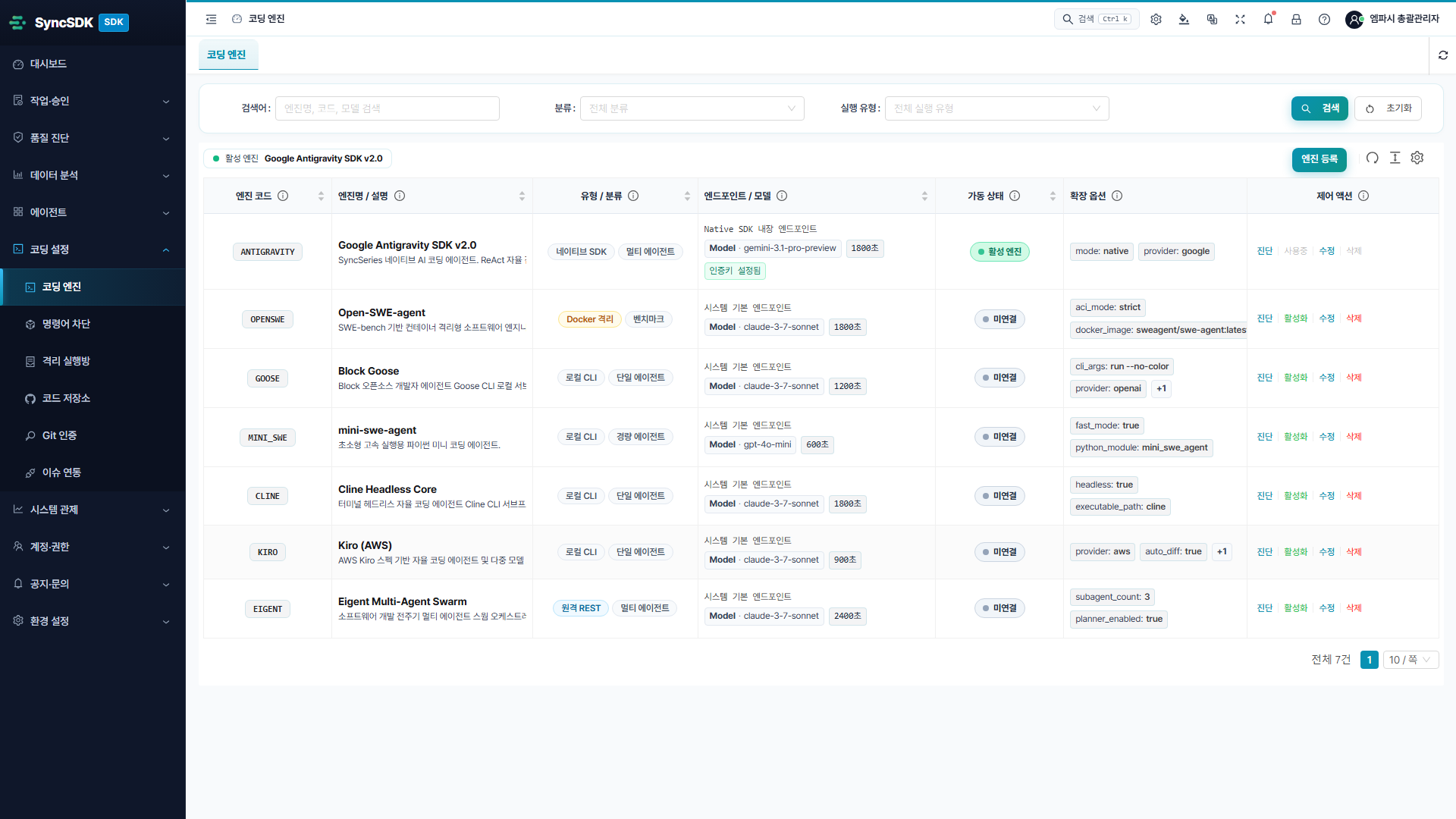
1. Runtime Hot-Swap & Routing Control for 15 Multi-Coding Agent Engines
Control the status and dynamic model mapping of 15 coding engines—including ANTIGRAVITY, CLAUDE_CODE, GITHUB_COPILOT, CODEX_CLI, GEMINI_CLI, CURSOR_CLI, OPENHANDS, and OPENSWE—through a single interface.
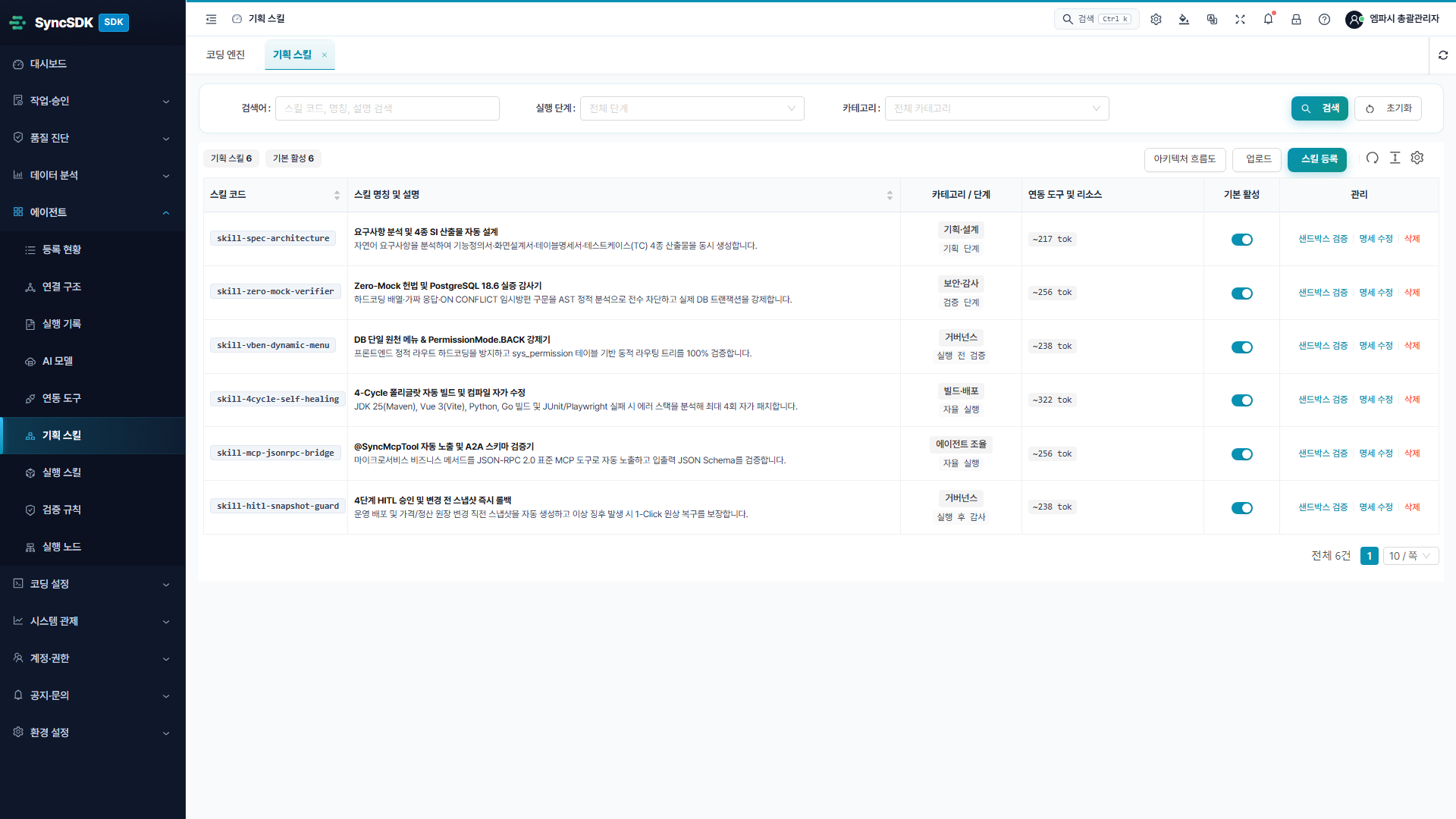
2. Domain Skill Registry & Dynamic Prompt Template Management
Centrally manage DB-backed zero-downtime prompt templates, version history rollbacks, and specialized per-agent skill harnesses.
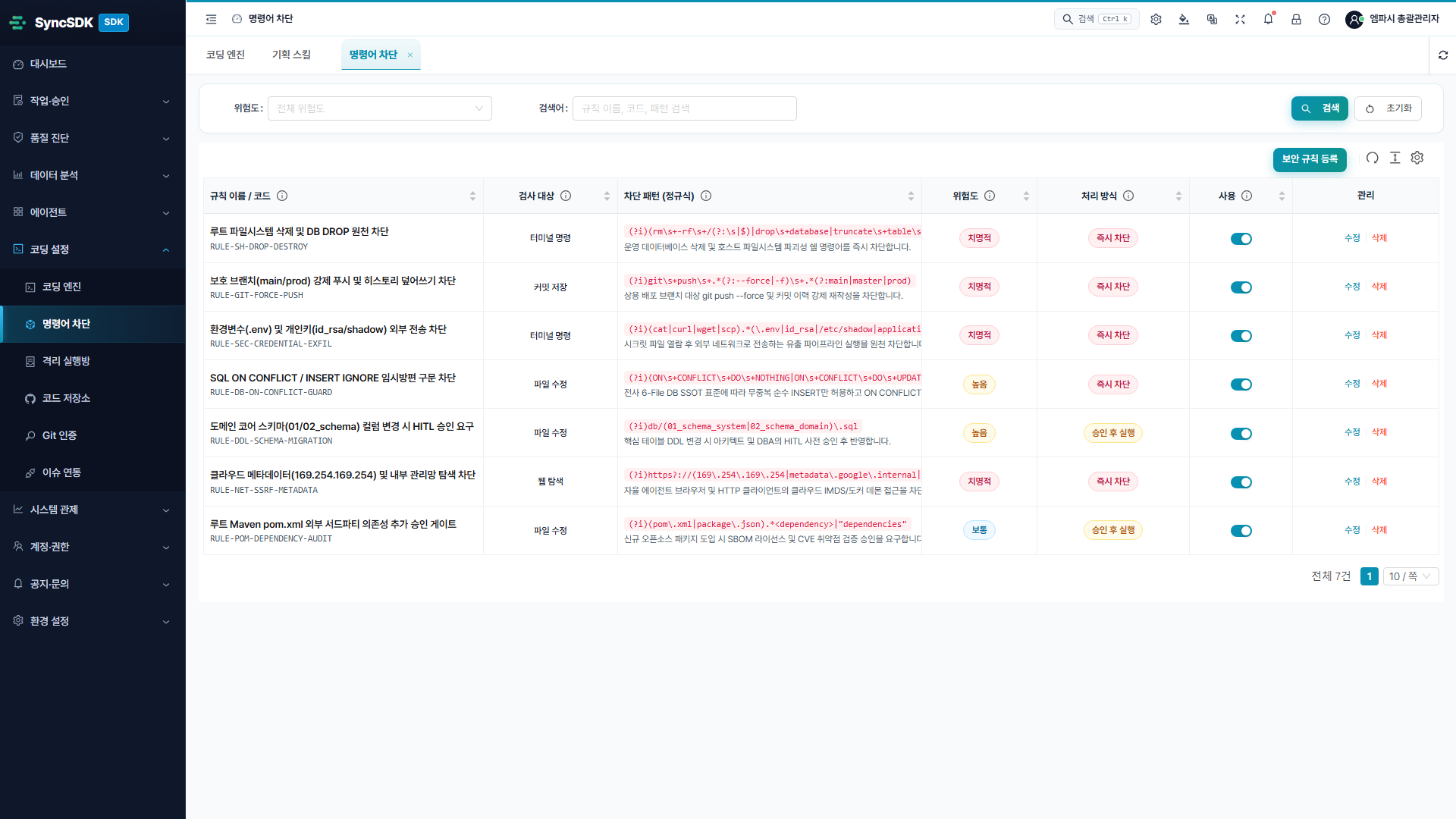
3. Isolated Sandbox Execution Security Policy: Dangerous Command Blocking & Approval Rules
Enforce dangerous command blocking and administrator approval-before-execution guardrails for terminal commands, file edits, commits, and web browsing executed by coding agents in isolated sandboxes.
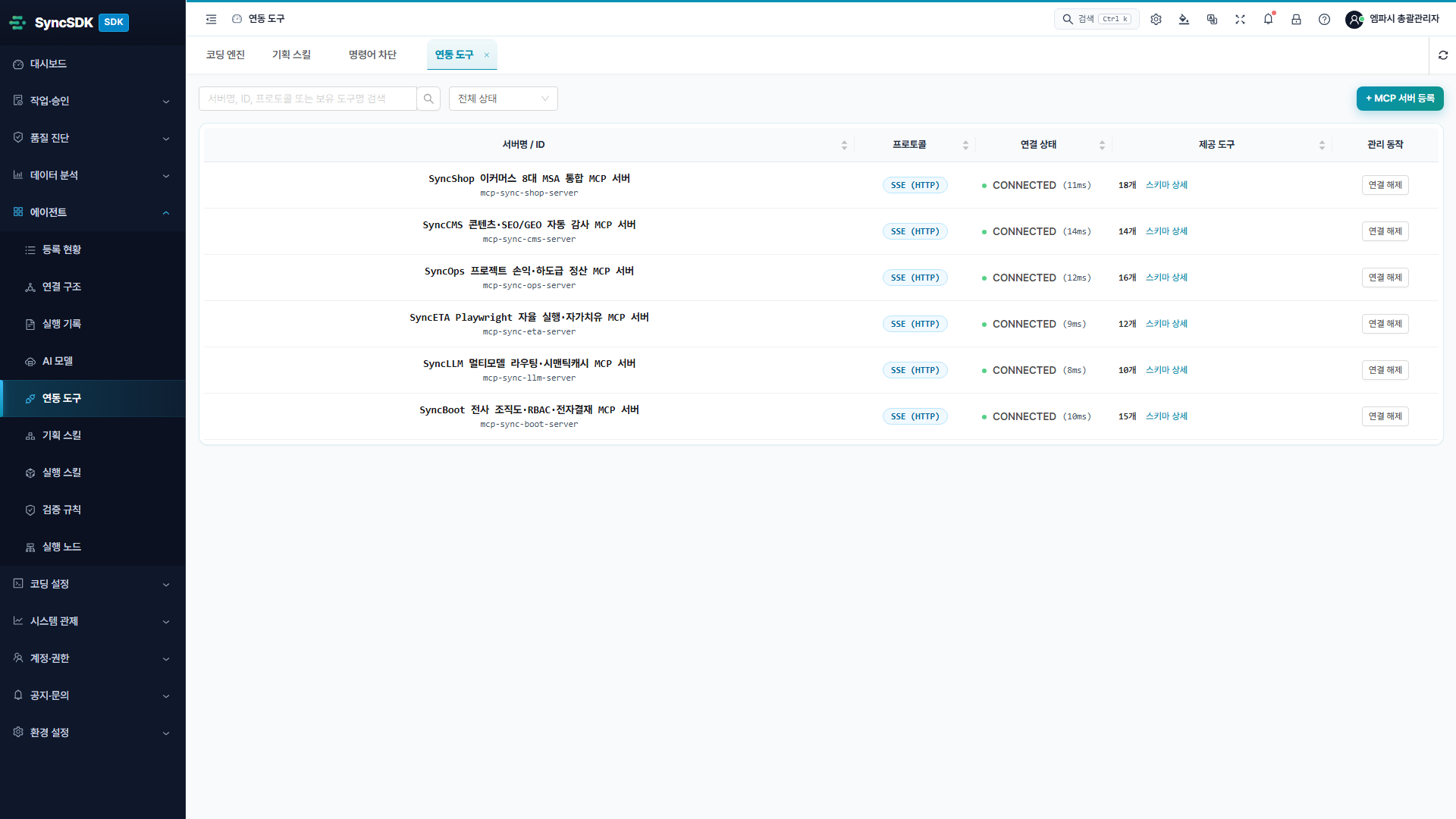
4. Enterprise Standard MCP Tool Registry & Endpoint Integration Status
Inspect JSON Schema specifications, safety levels, and real-time invocation metrics for domain agent tools.
3. Developer Guide Index
- Developing Custom Tools for Internal Systems (MCP): Practical tutorial on packaging internal REST APIs and RDB queries as standard JSON-RPC tools.
- Sync SDK Interface Reference: Key classes and error-handling standards in the
com.empasy.sync.sdkpackage. - Real-Environment Testing Guide (Zero-Mock): Guide to verifying agent tool calls and behaviors in real container environments without mock objects.